Your AI coding agent can't see the page it just built.
FrameWatch gives Claude Code a real browser. It sees the page, measures what it made, clicks through it, and fixes what it got wrong — before it says "done".
claude mcp add framewatch -- npx -y framewatch-mcp-server@latest
That is the whole install. No account, nothing to configure.
- MCP server, MIT licensed
- Chromium via Playwright
- Runs on your machine only
- Node 20.9 or newer
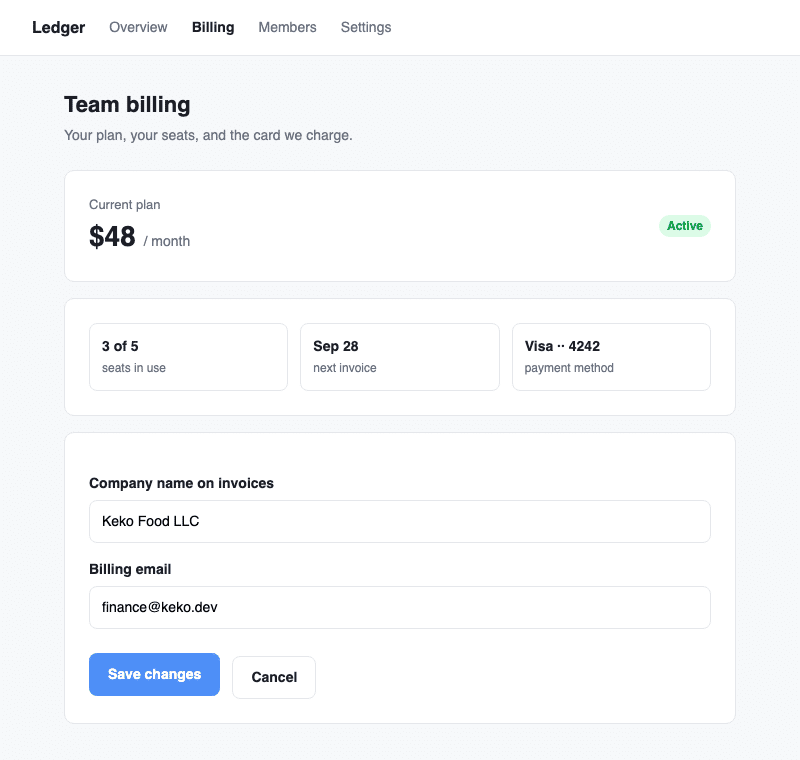
framewatch_inspect. Three planted mistakes, three found.
How a session goes
The same loop a careful developer runs with devtools open, done by the agent, in seconds.
-
Look
A screenshot of the page as it is, or a recording that keeps only the frames where something changed.
framewatch_screenshot · capture -
Name and act
Every element on the page with a ref. The agent clicks
e33instead of guessing a selector.framewatch_snapshot · interact -
Measure
The box, the font, the rendered colours with a contrast verdict, the spacing and the alignment to neighbours.
framewatch_inspect -
Edit, then wait
Save the file. FrameWatch returns the moment Vite has patched the open page, and the loop starts over.
framewatch_wait_for
What you say, and what comes back
You talk to Claude Code as usual. It picks the tools. Every result below is real, trimmed only for length.
What's on the billing page? I want to change the cancel button.
Instead of guessing a selector from a screenshot, the agent gets every element by name with a ref it can act on.
Snapshot of http://localhost:5173/billing — "Ledger — Team billing" — 31 elements, 8 interactive

- link "Overview" [ref=e5] → "#"
- link "Billing" [ref=e6] → "#"
- link "Members" [ref=e7] → "#"
- link "Settings" [ref=e8] → "#"
- textbox "Company name on invoices" [ref=e28]: Keko Food LLC
- textbox "Billing email" [ref=e30]: [email protected]
- button "Save changes" [ref=e32]
- button "Cancel" [ref=e33]
Test the login with [email protected] and show me what happens.
A before and an after frame, the request the click made, what the console said, and a nudge to save the session so it never logs in by hand again.
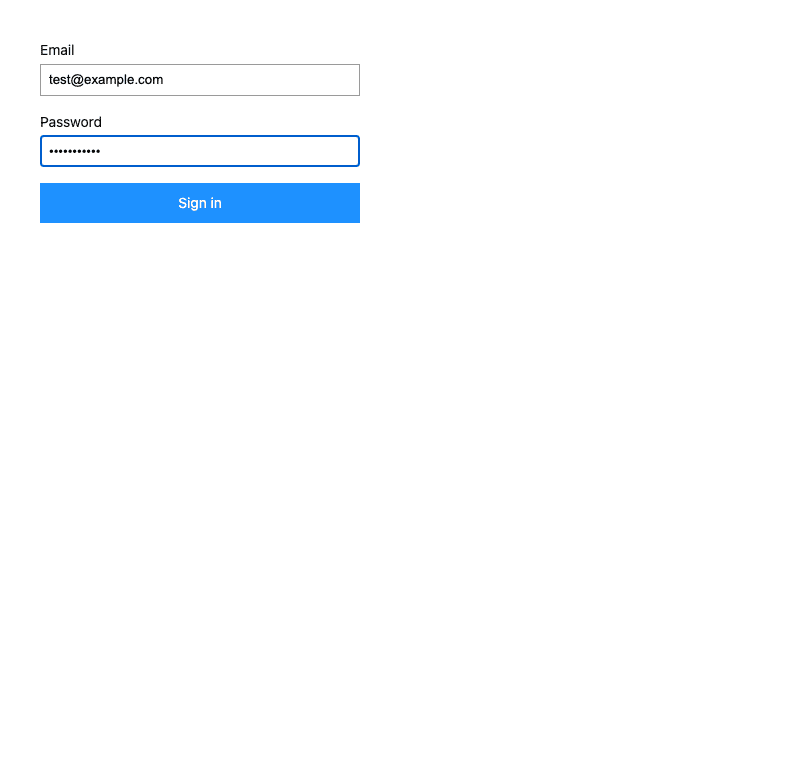

click "#submit" on http://localhost:5173/login — 10.1% of the frame changed
Context — console: 1 entry; network: 1 request
Signed in? Save this session with framewatch_save_auth so every later call starts here.
Changed: 10.1% — region: 20,20 360x240
Console:
  [info] auth token stored
Network:
  POST http://localhost:5173/api/login → 200 (124ms)
I just changed App.vue. Show me the page once it has reloaded.
No reload, no sleep, no replayed flow. FrameWatch watches Vite and returns the moment the hot update lands, then measures the result.
Hot update landed after 1158ms: /src/App.vue — Vue 3.5.42 — route /login (login)
Every frame carries its reasons
A screenshot says something is wrong. The context from the same moment says why.
Console
Logs, warnings, uncaught errors and unhandled rejections, on by default, split across the frames they happened between.
Network
Every request with its status and timing, including the ones that failed or were still pending when the recording ended.
DOM
Which elements appeared, disappeared or changed attributes between two frames, collapsed into a few readable lines.
Performance
First paint, largest contentful paint and layout shifts, measured at the frames they belong to.
Quick start
Four steps, and the first one is the only install.
-
Register it with Claude Code
claude mcp add framewatch -- npx -y framewatch-mcp-server@latest -
Let it see full results
Claude Code caps a tool result at 25,000 tokens and counts images toward it, which holds about two screenshots of a real page. Raise it once in the shell you start Claude Code from, and add the line to your shell profile.
export MAX_MCP_OUTPUT_TOKENS=100000 -
Start your app and ask
Run your dev server as usual, open Claude Code in the project, and talk to it normally. It picks the tools itself.
The header looks wrong on mobile. Check it at phone width and fix it.
Open the settings page and tell me what you see.
-
Sign in once, if your app has a login
Ask Claude Code to log in and save the session. From then on every tool opens pages already signed in, and says so.
Log in at localhost:5173/login with my test account and save the session.
Not using Claude Code? Every other agent takes the same server, in its own config file.
Updates are automatic. The @latest in the command makes every new session run the newest release. If you installed without it, run npx clear-npx-cache once, or re-register with the command above.
Install in any AI coding agent
FrameWatch is a standard MCP server over stdio. Pick your agent; the snippet is the whole setup.
One command in the terminal. Add --scope user to make it available in every project.
claude mcp add framewatch -- npx -y framewatch-mcp-server@latestThen export MAX_MCP_OUTPUT_TOKENS=100000 in the shell you start Claude Code from, so captures arrive whole. This cap is specific to Claude Code.
In .cursor/mcp.json for one project, or ~/.cursor/mcp.json for all of them. Or Settings, MCP, Add new server.
{
  "mcpServers": {
    "framewatch": { "command": "npx", "args": ["-y", "framewatch-mcp-server@latest"] }
  }
}
In ~/.codeium/windsurf/mcp_config.json, or Settings, Cascade, MCP Servers, Add.
{
  "mcpServers": {
    "framewatch": { "command": "npx", "args": ["-y", "framewatch-mcp-server@latest"] }
  }
}
In .vscode/mcp.json in the workspace. GitHub Copilot's agent mode picks it up; note the key is servers.
{
  "servers": {
    "framewatch": { "type": "stdio", "command": "npx", "args": ["-y", "framewatch-mcp-server@latest"] }
  }
}
In ~/.codex/config.toml.
[mcp_servers.framewatch]
command = "npx"
args = ["-y", "framewatch-mcp-server@latest"]
In ~/.gemini/settings.json, or .gemini/settings.json in the project.
{
  "mcpServers": {
    "framewatch": { "command": "npx", "args": ["-y", "framewatch-mcp-server@latest"] }
  }
}
In ~/Library/Application Support/Claude/claude_desktop_config.json on macOS, %APPDATA%\Claude\claude_desktop_config.json on Windows. Restart the app.
{
  "mcpServers": {
    "framewatch": { "command": "npx", "args": ["-y", "framewatch-mcp-server@latest"] }
  }
}
Cline, MCP Servers, Configure MCP Servers, which opens cline_mcp_settings.json.
{
  "mcpServers": {
    "framewatch": { "command": "npx", "args": ["-y", "framewatch-mcp-server@latest"] }
  }
}
In ~/.continue/config.yaml, or a file under .continue/mcpServers/ in the project.
mcpServers:
  - name: framewatch
    command: npx
    args: ["-y", "framewatch-mcp-server@latest"]
In Zed's settings.json.
{
  "context_servers": {
    "framewatch": { "source": "custom", "command": "npx", "args": ["-y", "framewatch-mcp-server@latest"], "env": {} }
  }
}
Settings, Tools, AI Assistant, Model Context Protocol, Add, then paste this as the JSON configuration.
{
  "mcpServers": {
    "framewatch": { "command": "npx", "args": ["-y", "framewatch-mcp-server@latest"] }
  }
}
Every client needs Node 20.9 or newer on the PATH. The first run downloads Chromium through Playwright; if that fails, run npx playwright install chromium once. Any agent not listed that can run a stdio MCP server takes the same npx -y framewatch-mcp-server@latest command.
Eighteen tools, one browser
Grouped by what the agent is trying to do.
See
What the page looks like, now and over time.
screenshot- One page or one element, right now.
capture- A few seconds, keeping only the frames where something changed.
responsive- Phone, tablet and desktop widths, with overflow reported.
compare- Two URLs, or before and after, every differing pixel overlaid.
Act
Find things by name and do something to them.
snapshot- Every element with a ref to act on.
interact- Click, type, scroll, one action at a time, on a page that stays open.
wait_for- Vite's hot update, a mounted Vue app, an element, or a quiet network.
save_auth- Sign in once; every later call starts past the login.
Measure and check
Facts a screenshot cannot give.
inspect- Box, font, colours with contrast, spacing, alignment — or a design inventory.
accessibility- An axe-core WCAG audit.
seo- What a search engine and a link preview make of the page.
rtl- Flip the page for Arabic, Hebrew or Persian and report what failed to mirror.
Break things on purpose
Find out what the page does when things go wrong.
form_test- Valid, empty, huge, Arabic and hostile input in every form.
dead_clicks- Click everything that looks clickable; report what did nothing.
links- Where every link goes: broken, redirected, refused, or pointing at nothing.
api_mock- Answer the page's API calls yourself: empty, 500, slow, malformed, offline.
start_server- Bring the dev server up, and
stop_serverto take it down.
How it differs from a browser MCP
Playwright MCP and Chrome DevTools MCP give the agent a browser. FrameWatch gives it judgement about what it sees.
Only what changed
A browser MCP returns a screenshot per call. FrameWatch records at 10 frames a second and returns the handful where something meaningful happened, each cropped to the region that changed.
Numbers, not impressions
"Looks fine" is not a check. Inspect returns the box, the font, the rendered colours with a WCAG verdict, the padding and the alignment to the neighbours.
Images that arrive
Claude Code drops a whole tool result that exceeds its token cap, images included. FrameWatch fits every result to the cap in a fixed order and says what it cut.
Questions
Does it work with React, Svelte or plain HTML?
Yes. Every tool works on any page a browser can open. Only three things are Vue-specific: the component names in inspect, navigation through vue-router, and the hot-update wait, which watches Vite.
Does it send my app anywhere?
No. FrameWatch runs on your machine, talks to Claude Code over stdio, and only opens the URLs it is given. Nothing listens on a port and nothing phones home.
Which MCP clients does it support?
Claude Code with one command, and any stdio MCP client. Cursor, Windsurf, Claude Desktop and Zed take the same command in their MCP settings.
Why raise MAX_MCP_OUTPUT_TOKENS?
Claude Code caps a tool result at 25,000 tokens and counts images toward it. FrameWatch always fits under the cap and says what it trimmed, but the default only holds about two screenshots of a real page. 100,000 lets captures arrive whole.
How much does it cost?
Nothing. It is MIT licensed and there is no service behind it. The only cost is the tokens Claude Code spends reading the images, which the result budget keeps in check.